
YASnippet for Markdown Images in Jekyll
Fri 2 Oct 2026
In my last post I mentioned that I keep forgetting the syntax for adding images here, so this is a note on how to create an editor snippet with YASnippet for Emacs. Markdown mode has a shortcut for inserting images, but for Jekyll I use the Liquid relative_url filter which prepends the site’s baseurl to an image’s URL. Not needed now since my site is not at a subdomain, but if it were to change, the filepaths could stay the same. Some time ago when I tested this on localhost the images weren’t showing up, so I do it now as a precaution. (But maybe that wasn’t the issue then, as of course right now everything works when I leave the filter off). Either way, it’s a fun opportunity to learn about editor snippets.
When I want to share images, I write something like this in my markdown files:

Hard one to remember!
YASnippet
YASnippet is a template system for Emacs. It allows you to type an abbreviation and automatically expand it into function templates.
I’d learned about Emacs YASnippet a while back and I used it sporadically when I wrote out this site by hand, but it’s been a few months since then so I’m jotting down notes on how these snippets are created for future reference.
My snippets are saved at ~/.emacs.d/snippets/. There is a directory for each major mode with available snippets (YASnippet used to come bundled with pre-made snippets but apparently not anymore).
My init.el file has these lines:
(setq yas-snippet-dirs
      '("~/.emacs.d/snippets"))

(yas-global-mode 1)
Creating a snippet
Snippets can be created with M-x yas-new-snippet or the keybind C-c & C-n (you gotta type the ampersand too).
I created this file:
~/.emacs.d/snippets/markdown-mode/+images+
The name of the file could be anything, so the + symbols around it are not necessary, but the new snippet wizard adds them in so I left it alone.
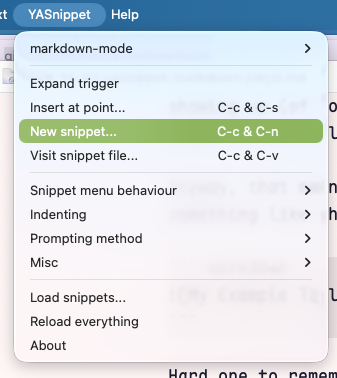
The YASnippet documentation is great, and at this point I also used this guide I found from Arjan van der Gaag. My needs were much simpler, but it’s nice to know YASnippet can execute Emacs Lisp code wrapped around backticks. In the future I might find an excuse to use this.
The full snippet looks like this:
# -*- mode: snippet -*-
# name: Insert image
# key: img
# --

$0
The comments at the top are metadata about the snippet. The main one here is the value for the key directive, which is the abbreviation you type before expanding the snippet by hitting TAB. Running M-x yas-expand does the same.
In the snippet body, each $1, $2 is a tab stop field. I labeled these fields with placeholder text enclosed within {} brackets as a hint of what to enter, but this is not necessary. The $0 tab stop is where the cursor ends after tabbing through each value.
In practice I type img and hit TAB and it looks like this:

That’s it! This post served as an excuse to practice adding images and even a GIF.
Unrelated, but I also spent some time adding code block syntax highlighting and tweaking some CSS, which is fun in and of itself. Now the word snippet is starting to look funny.