Wed 21 Oct 2026
Over the past couple of weeks I have been experimenting with Linux Mint on two devices: a MacBook Pro and a Microsoft Surface Laptop. You don’t really notice the habits you develop over years of using macOS, so spending time with Mint in different hardware was a good opportunity to question which ones were worth keeping and also try out new experiences altogether.
For future reference and because I believe sharing what we do fosters adoption, in this note I will jot down the tweaks and changes I made for a practical and joyful configuration.
Touchpad Gestures
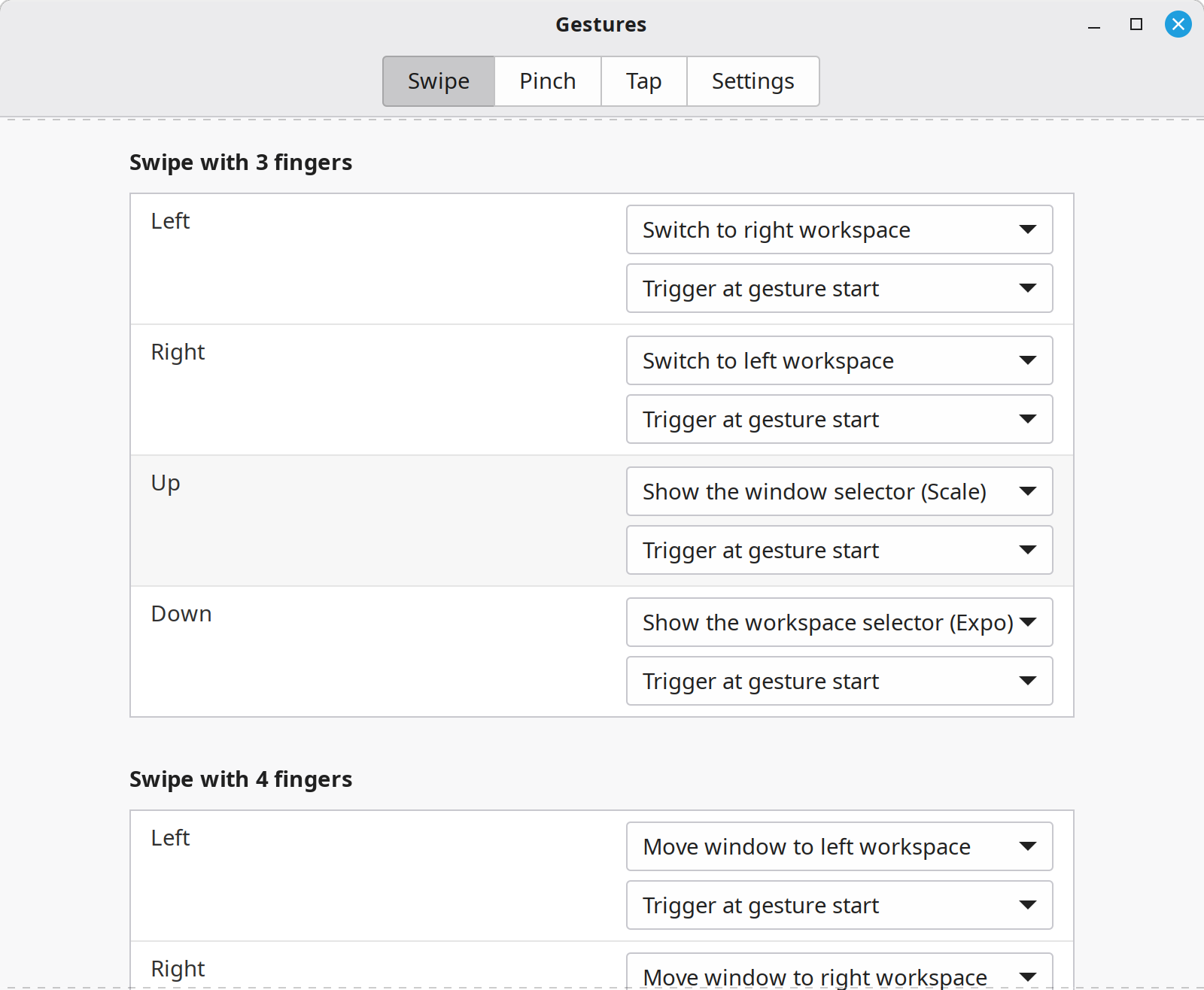
Coming from macOS means being used to touchpad gestures. On Linux Mint, these are even better! Here is my configuration:
3 Finger Gestures
These are pretty much the same ones as I use on macOS:
- Swipe left to switch to right workspace
- Swipe right to switch to left workspace
- Swipe up to show the window selector in Scale view (what Apple calls “Mission Control”)
- Swipe down to show the window selector in Expo view
4 Finger Gestures
- Swipe left to move current window to left workspace
- Swipe right to move current window to right workspace
- Swipe down to minimize current window
- Swipe up to maximize most recent window
The swipe up and down gestures are set through custom commands.
To minimize current window (swipe down):
gdbus call --session --dest org.Cinnamon --object-path /org/Cinnamon --method org.Cinnamon.Eval 'global.display.focus_window.minimize()'
To maximize past window (swipe up):
gdbus call --session --dest org.Cinnamon --object-path /org/Cinnamon --method org.Cinnamon.Eval 'let ws = global.workspace_manager.get_active_workspace(); let m = global.display.sort_windows_by_stacking(ws.list_windows().filter(w => w.minimized)); let w = m[m.length - 1]; if (w) { w.unminimize(); w.activate(global.get_current_time()); }'
I set all gestures to trigger at gesture start.
Hot Corners
I’d never been a user of Hot Corners on macOS but I find them useful in Mint when I have the laptop docked and I’m using a larger monitor with a mouse.
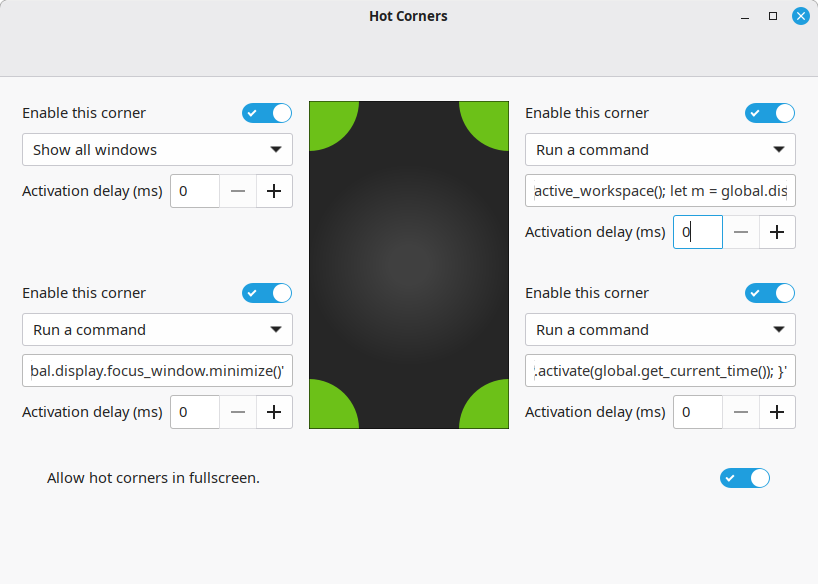
- Top Left: Show all windows
- Top Right: Maximize most recent window
- Bottom Left: Minimize current window
- Bottom Right: Switch to previous window (like a makeshift Alt-Tab)
Minimize and maximize reuse the scripts above. The custom Alt-Tab command is this:
gdbus call --session --dest org.Cinnamon --object-path /org/Cinnamon --method org.Cinnamon.Eval 'const Meta = imports.gi.Meta; let ws = global.workspace_manager.get_active_workspace(); let tabs = global.display.get_tab_list(Meta.TabList.NORMAL, ws); let w = tabs[1]; if (w) { if (w.minimized) w.unminimize(); w.activate(global.get_current_time()); }'
Keyboard Settings
To keep the muscle memory of the macOS keyboard layout I installed keyd to handle the remapping. Note that you’ll need to have git installed for this to work.
In /etc/keyd/default.conf:
[ids]
*

[main]
capslock = layer(control)
leftmeta = layer(control)
leftcontrol = layer(meta)
Emacs
Emacs required a bit of experimentation but here is what’s working for me.
In ~/.config/keyd/app.conf :
[emacs]
leftmeta = layer(meta)

[Emacs]
leftmeta = layer(meta)
I coupled this with an entry in ~/.config/autostart/ so it would launch at startup.
In a file called ~/.config/autostart/keyd-autostart.desktop:
[Desktop Entry]
Type=Application
Exec=keyd-application-mapper -d
X-GNOME-Autostart-enabled=true
NoDisplay=false
Hidden=false
Name[en_US]=Keyd mapper for a sane Emacs lol
Comment[en_US]=No description
X-GNOME-Autostart-Delay=5
In my init.el I remapped the Super key for what Emacs does on macOS already.
(global-set-key (kbd "s-a") #'mark-whole-buffer)
(global-set-key (kbd "s-c") #'kill-ring-save)
(global-set-key (kbd "s-x") #'kill-region)
(global-set-key (kbd "s-v") #'yank)
(global-set-key (kbd "s-z") #'undo)
(global-set-key (kbd "s-Z") #'undo-redo)
(global-set-key (kbd "s-s") #'save-buffer)
(global-set-key (kbd "s-f") #'isearch-forward)
(global-set-key (kbd "s-w") #'kill-current-buffer)
(global-set-key (kbd "s-q") #'save-buffers-kill-terminal)
Over time I set up custom commands like Control + Q to replace Alt + F4 for quitting programs, Control + Space to open up the main menu and start searching (emulating spotlight search in macOS). Same for screenshots, using Control + Shift [4, 5, 6].
Toggle Touchpad via Keyboard Shortcut
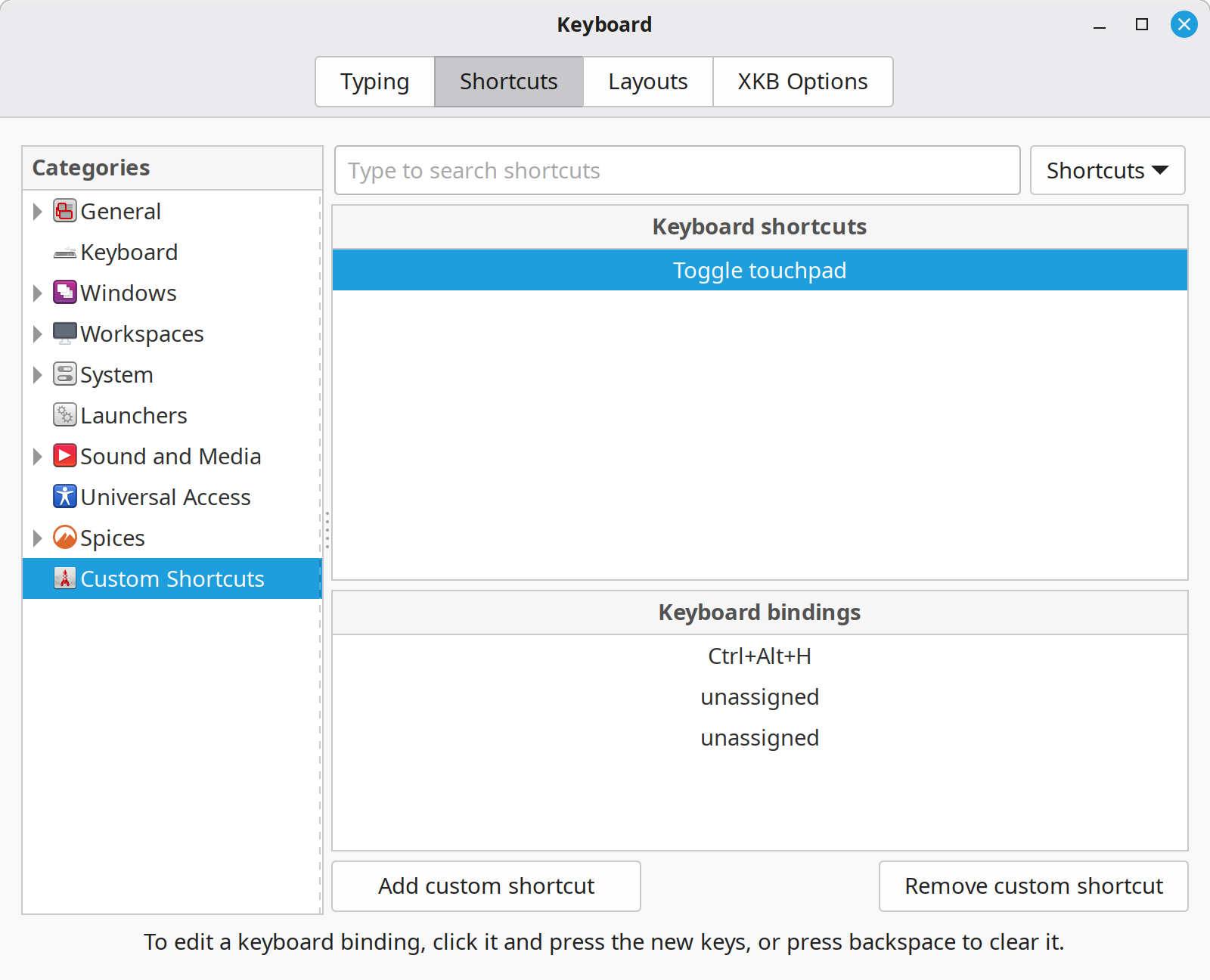
I created a keyboard shorcut mapped to Ctrl-Alt-H to toggle the touchpad. I find that sometimes the side of my thumb grazes the touchpad when I’m typing, sending my cursor flying elsewhere in a document.
This script comes from a post in Karlinux’s blog.
In ~/.local/bin/touchpad.sh:
#!/usr/bin/env bash

key="org.cinnamon.desktop.peripherals.touchpad"
state="$(gsettings get "$key" send-events)"

if [ "$state" = "'enabled'" ]; then
  gsettings set "$key" send-events disabled
  notify-send "Touchpad disabled"
else
  gsettings set "$key" send-events enabled
  notify-send "Touchpad enabled"
fi
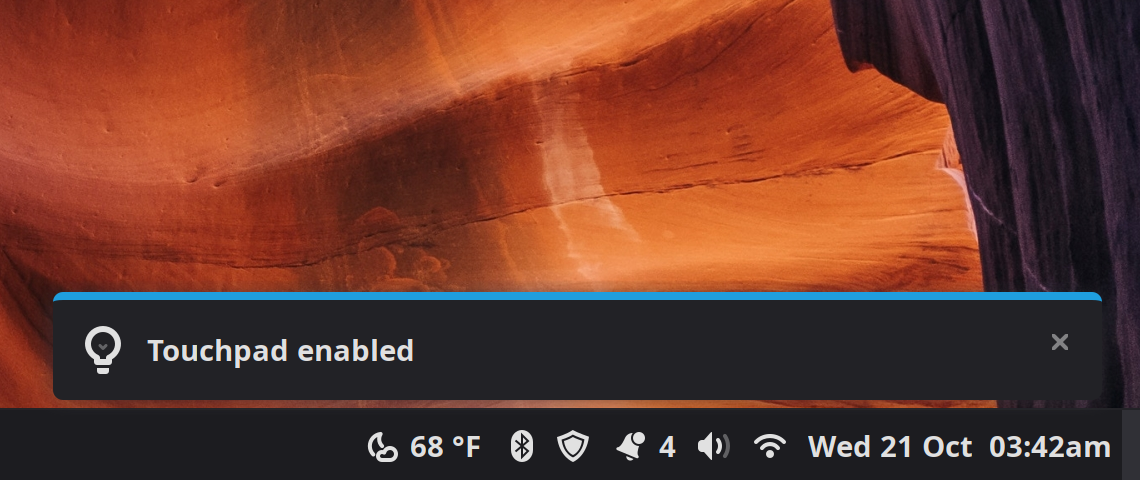
The script will send a notification indicating the state of the touchpad.
Fonts
One noticeable change coming from macOS was the different fonts on websites I visit often. After a few days I decided to simply bring all the fonts in my macOS to Linux Mint. That was mostly necessary for Firefox because for the operating system itself I stayed with the defaults plus Maple I’ve been enjoying a lot!
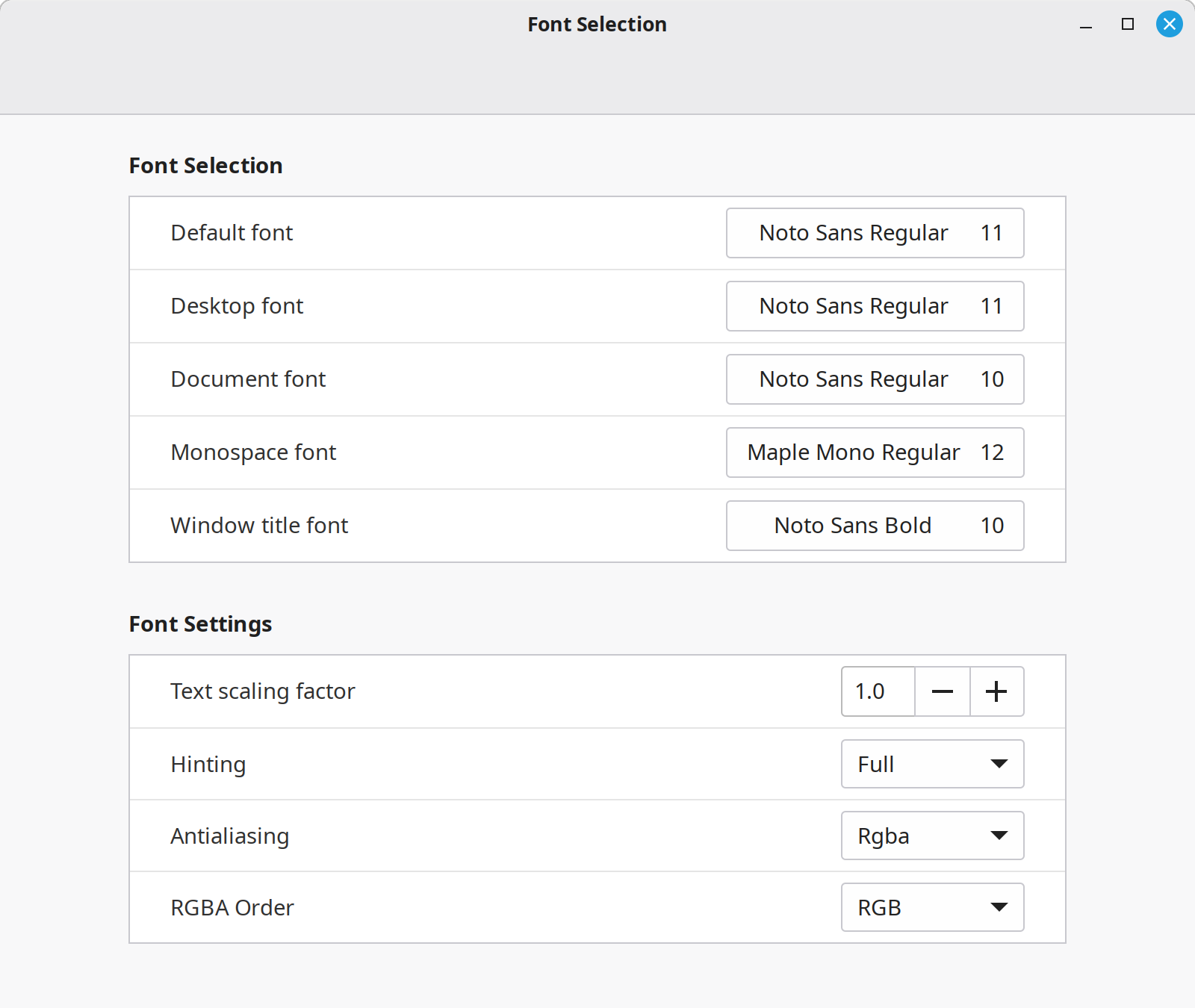
These were the settings that had been working for me on the Surface Laptop. Last night I noticed that I get some eyestrain while working on the MacBook Pro but not at all with the Surface, so I copied the same settings above to the Mac. Hopefully that does the trick!
Night Light
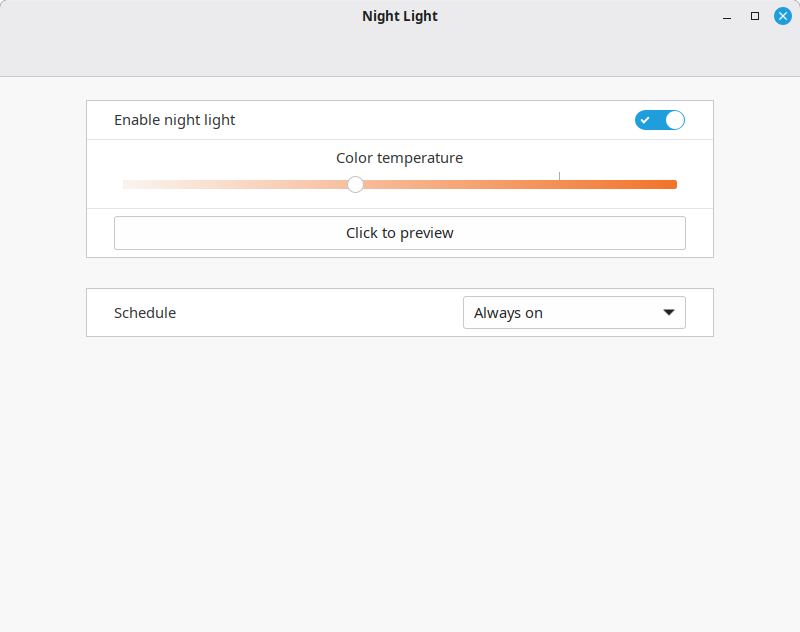
Another useful setting to enable is setting up Night Light. That’s the blue light filter. I apparently rely on this a lot because without it my eyes kept hurting. I actually think that the “font rendering” issue that had caused the eyestrain was really due to me not enabling the filter. After enabling it… suddenly no more eye strain!
Cinnamon Actions, Extensions, and Applets
Cinnamon is the Linux Mint Desktop Environment. I read a YouTube comment saying something to the effect that it seems like Cinnamon is the desktop environment whose developers actually use :-) whereas with GNOME it’s like the devs use macOS instead.
All I can say is that Cinnamon is a very well thought-out desktop environment, with features and plugins (in the form of actions, extensions and applets) that suit pretty much every need.
Actions
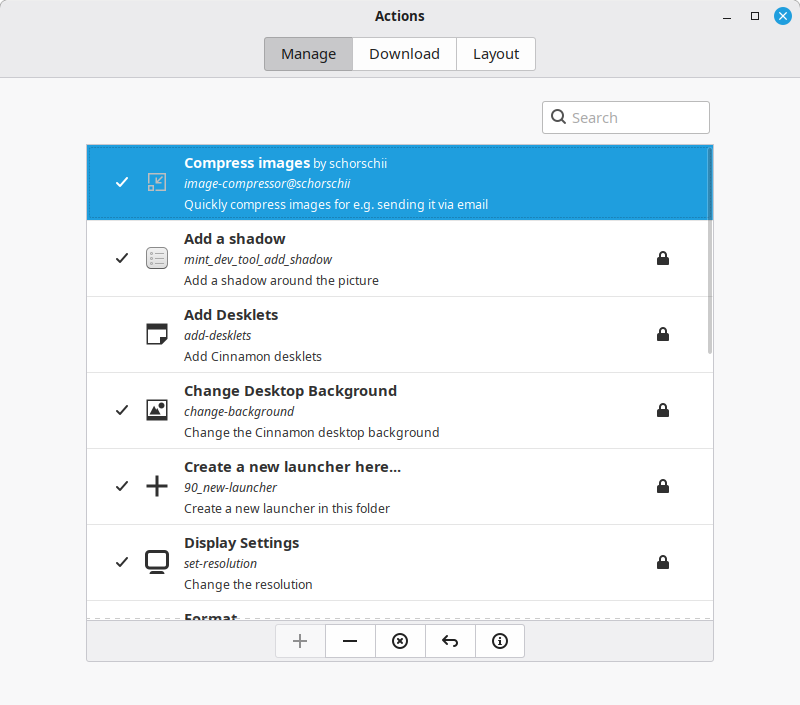
Actions are the custom commands that show up when you right-click in the file manager. I’m using the Compress images action to right-click on a picture and make it smaller. This is especially helpful for the images I share on this site, but of course it also works for anything else like e-mailing a screenshot.
Extensions
I’m not using any extensions (right now?) but there are plenty of options for customizing the look of the taskbar and adding effects like blurring.
Applets
These are the programs along the taskbar like the bluetooth manager, date, notifications, etc.

The only one I’ve installed is the weather applet. There are lots of options available from the community. One I also liked is the applet to switch the theme from light to dark mode. It has lots of customization settings including the option to switch wallpapers and toggling between themes. I tested it for a bit but I ended up confirming that I’m just not a dark mode user!
Linux Mint
Using Linux Mint has been really fun. It had been a while since I had spent any time in the Linux world at all, not since I was around 13 or 14 and I distrohopped for a bit. Even back then, Linux Mint was my favorite distribution. Anything I didn’t like could simply be modified until I did. I mean, I was even able to add a couple of buttons for creating a new post or sharing a link to my blog directly from my home menu. How cool is that! Over time, the operating system molds to my habits, decisions, and the type of computer tasks I do; while I haven’t spent enough time in Mint for it to be overtly noticeable, that’s exactly why and how I have used Emacs. Little by little, Emacs has adapted to me. And now with Linux Mint, there’s an opportunity for this philosophy to extend beyond my text editor to my entire computing environment.

Sat 3 Oct 2026
Thoughts of Widdershins writes:
I see a lot of posts about people leaving platforms.
…
What strikes me is that hardly anyone is leaving for something big. They’re going smaller. A personal site, a self-hosted app, a capsule nobody’s going to stumble onto by accident.
Gordon over at Happily Imperfect wrote a reply and made some good observations I want to expand on here.
I wonder if everyone who cares about a better, more open internet packs up and retreats to their own little corners, aren’t we also leaving the big platforms with an even bigger share of the conversation?
No, because there is no mutually respectful dialogue between us the users and them the platform owners and the system they establish. On the contrary, platform owners always have control over us, and can do with our data as they please.
It is our human interactions that give those platforms value. It’s the photodumps from celebrities, athletes, and college students alike. It’s the birthday wishes for family members, the acoustic covers, the makeup tutorials and cat photos.
That goes for all big platforms. GitHub becomes useless when it runs out of human intelligence and code with which to train models. Likewise, Twitter becomes proof of the dead internet theory when people take their commentary and witty remarks elsewhere.
I mean I know that Facebook has already won, that many millions of people think it IS the internet, and exist happily in that bubble, but part of me thinks there must be somewhere to fight back… or is it as futile as I imagine?
It’s not futile and there’s hope! I think Gordon hits the nail on the head by proposing that we provide alternatives instead of simply packing up and letting things go bad. We can make good changes on the open web, where you and I are netizens with rights and liberties, not serfs in the fiefdom of Facebook.
What if we had a village instead? I want to be a villager.
And there’s another problem. If we all disperse into hundreds or thousands of smaller independent spaces, how do we find each other?
We find each other like this! We reply and engage in conversations deliberately. It’s the best way to let you know I read your post and I liked what I saw, and I cared about what you said, so much so that I took the time to write this hoping you would read it because I care about having meaningful interactions online.
This means there won’t be a platform that will solve these discovery problems completely, because the goal of a platform is to capture our attention while we passively consume content.
In indie web circles, the notion of a digital garden is popular and also, I think, a great metaphor for the kind of environment we want to foster. Perhaps not a set of lovely little islands estranged from each other, but a friendly village with sovereign gardens where we welcome our neighbors.
Fri 2 Oct 2026
In my last post I mentioned that I keep forgetting the syntax for adding images here, so this is a note on how to create an editor snippet with YASnippet for Emacs. Markdown mode has a shortcut for inserting images, but for Jekyll I use the Liquid relative_url filter which prepends the site’s baseurl to an image’s URL. Not needed now since my site is not at a subdomain, but if it were to change, the filepaths could stay the same. Some time ago when I tested this on localhost the images weren’t showing up, so I do it now as a precaution. (But maybe that wasn’t the issue then, as of course right now everything works when I leave the filter off). Either way, it’s a fun opportunity to learn about editor snippets.
When I want to share images, I write something like this in my markdown files:

Hard one to remember!
YASnippet
YASnippet is a template system for Emacs. It allows you to type an abbreviation and automatically expand it into function templates.
I’d learned about Emacs YASnippet a while back and I used it sporadically when I wrote out this site by hand, but it’s been a few months since then so I’m jotting down notes on how these snippets are created for future reference.
My snippets are saved at ~/.emacs.d/snippets/. There is a directory for each major mode with available snippets (YASnippet used to come bundled with pre-made snippets but apparently not anymore).
My init.el file has these lines:
(setq yas-snippet-dirs
      '("~/.emacs.d/snippets"))

(yas-global-mode 1)
Creating a snippet
Snippets can be created with M-x yas-new-snippet or the keybind C-c & C-n (you gotta type the ampersand too).
I created this file:
~/.emacs.d/snippets/markdown-mode/+images+
The name of the file could be anything, so the + symbols around it are not necessary, but the new snippet wizard adds them in so I left it alone.
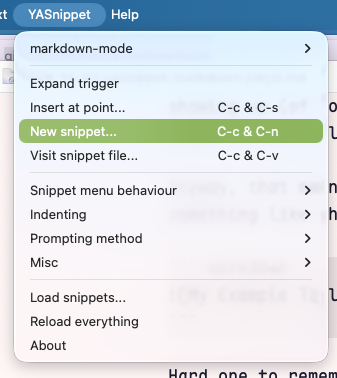
The YASnippet documentation is great, and at this point I also used this guide I found from Arjan van der Gaag. My needs were much simpler, but it’s nice to know YASnippet can execute Emacs Lisp code wrapped around backticks. In the future I might find an excuse to use this.
The full snippet looks like this:
# -*- mode: snippet -*-
# name: Insert image
# key: img
# --

$0
The comments at the top are metadata about the snippet. The main one here is the value for the key directive, which is the abbreviation you type before expanding the snippet by hitting TAB. Running M-x yas-expand does the same.
In the snippet body, each $1, $2 is a tab stop field. I labeled these fields with placeholder text enclosed within {} brackets as a hint of what to enter, but this is not necessary. The $0 tab stop is where the cursor ends after tabbing through each value.
In practice I type img and hit TAB and it looks like this:

That’s it! This post served as an excuse to practice adding images and even a GIF.
Unrelated, but I also spent some time adding code block syntax highlighting and tweaking some CSS, which is fun in and of itself. Now the word snippet is starting to look funny.